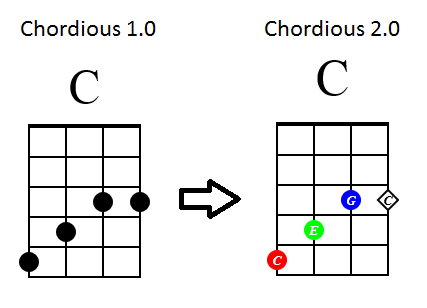
Chordious 2 is almost here

It’s been a while since I posted last, and a lot of work has gone into Chordious’ style editor in that time. So today, I thought I’d give a quick update, and I’m proud to say that all of the major work that I planned out for Chordious 2.0, both UI and features, is done as of a couple days ago. It’s all there in the latest preview build.

My focus now is on final fit and finish as well as some dedicated user testing before I cut the official 2.0 build. I’ll fix whatever minor bugs and inconveniences I find, and I should have the official build out before the end of the month.

After the build is ready, my next steps will be to refresh the website and then to start production on a long-awaited series of video tutorials to walk everyone through Chordious and all of its powerful features.

The end is in sight! Stay tuned!

/jon

Tagged with: ,
Posted in Dev News

The first half of the long-awaited style editor

It’s here. It’s finally here. The long-awaited style editor.

Well… at least the first half of it anyways.

In the last post, I talked about how the style editor was one of the biggest remaining undertakings for Chordious 2. It’s taken a lot of experimentation, testing, and just plain brute-force typing, but now you can set the default styling at various levels of Chordious.

In the last preview build you may have noticed a small little pen icon with a blue “s” doodle in the Diagram Library when you selected one of your collections. Opening it let you set the orientation of your diagrams (up-down or left-right). See, I began work on the style editor over a month ago, and I was just starting on the UI, when I unexpectedly found a nasty bug in Chordious that threw an error the first time you ran the app. So I ended up rushing out a fix, which meant revealing that barely started UI.

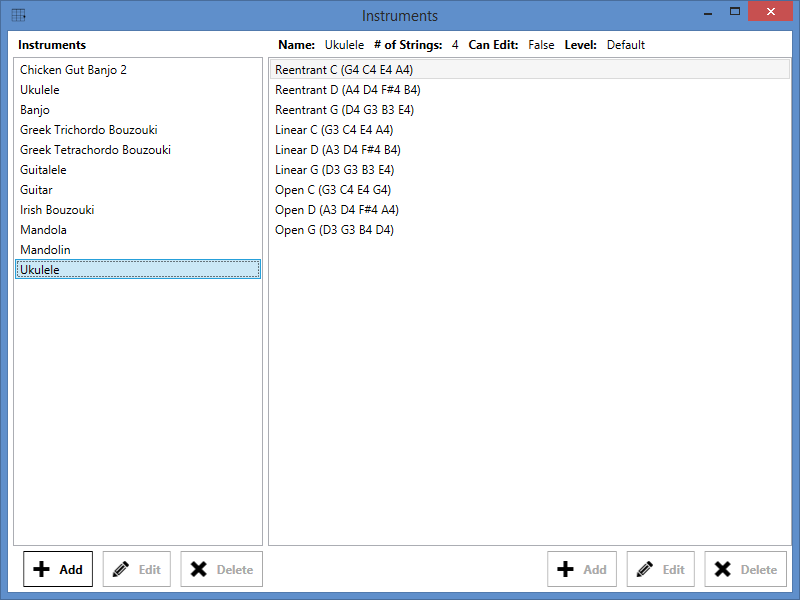
Now, weeks later, I’m ready to reveal the style editor in a more fleshed out form, starting with version 1.9.16145.449. As of now, you can set your default styling for the diagram (layout, colors, borders), the grid (spacing, margins, colors, etc.) and the title text (font, color, etc.). Everything uses translatable labels and helpful tool-tips. I’ve also updated the regular diagram editor to re-use those same labels and tool-tips.

As you’ll see, I’ve still got three more areas to complete: letting you configure the default styling for marks, fret labels, and barres. Those will come in the next update, as they’re a little trickier and will take more time to work out. I could have waited before revealing anything, but I thought it better to get what I have done out now so that I can gather feedback and fix bugs sooner.

I’ve tried to make the style editor as user-friendly as possible. You can get to it in one of three places:

  1. In the Diagram Library, right-click on a collection and choose “Edit Style of…”
  2. Also in the Diagram Library, select a collection and click on the style button (pen with the blue “s”) under the diagrams.
  3. For good measure, in Options > Style, there is now a “User Style Editor” button.

I’ll write a proper tutorial after Chordious 2 is official, but for now the basic idea is as follows:

  1. There are multiple “style levels” in Chordious, and there’s a selection box at the top of the editor.
    1. Underneath that is a textual summary of what that style level does.
    2. Underneath that is a list of tabs with all of the individual style controls.
  2. Each style level inherits the style settings of its parent level, and optionally overrides some of those settings.
  3. By changing the Selected Style at the top, you can see for yourself what each style level defines.
  4. To the left of each of the style settings below is a checkbox. If you want to override a setting, you can check that box and change the value.
  5. Don’t forget to hit “Apply” to save your changes.

As for the style levels themselves:

  1. “Default Style” / “App Style”: These are the style settings that I hard-coded into Chordious. You can’t change these directly.
  2. “User Style”: This is where you can override the Default styles for everything in Chordious. New diagrams, chord and scale finder results, everything.
  3. “Library Style”: This is where you can override “User Style” for all diagrams that are saved in your Library.
  4. “Collection Style”: This is where you can override the “Library Style” for all diagrams in the particular collection you have selected.

Remember, each level inherits from its parent level (and so on, and so on), only overriding the settings that you choose. For example, maybe you want the default title text color for all of your diagrams to be green. So you pick “User Style”, check the box next to the Title Color, and set the value to Green. Great, now every diagram will have a green title!

Then later, let’s say, you decide that for a certain collection you actually want the titles to default to blue. So, you select that collection and its “Collection Style”, check the box next to the Title Color, and set the value to Blue. Now all of the diagrams in that collection will have blue titles instead of green. But only in that collection! Since your User Style still specifies green titles, all of the other diagrams in your library will still have green titles.

Last of all, let’s say that for a particular individual diagram in that collection, you want to make the title black. So you double click on that diagram, and in the Diagram Editor you now have the option to check the box and choose Black for Title Color.

Now, each child overrides its parent. So, if you set an individual diagram to have a black title, and change the collection style from blue to something different, that particular diagram will keep its black title. In this way, you can easily change the look and feel of all of your diagrams, while making sure that some diagrams maintain their own little tweaks.

For example, maybe you set the title font size to be larger in your User Style. It looks great in general, but maybe you have a whole collection of jazzy minor 9th no 3rd flat 5th sharp 7th chords that now the title is too long and gets cut off. Now you can override the title font size just for that collection to be just a little smaller. Voila, the titles now fit! Or maybe it’s only one particular diagram that’s giving you trouble. so you override the font size for just that one diagram.

The combinations are endless!

I’m convinced it’s not that hard once you play around with it. If you’ve ever done kind of styling with HTML and CSS this will seem very familiar. For all my long-time users, update and give the style editor a whirl. Let me know what you think.

And as always, if you haven’t yet, download and try out the latest Chordious 2 Preview today!

/jon

Tagged with: , ,
Posted in Dev News

Chordious in 2016, and dreams of post 2.0

It’s been 5 months since the last big update, and in that time I took a little break from Chordious development to work on some side projects, but I’ve picked it back up in the last month or so. A big thank you to everyone for the continued feedback – it’s reassuring when I see that the problems people run into are more often due to something I just haven’t done yet, instead of things that I already did but are broken.

The biggest complaint/ask is around changing/managing the default styling for diagrams. And I totally expect that. It’s the last big problem to be solved before an official 2.0.

Easy and powerful diagram styling is the raison d’être for Chordious. The powerful part is already built-in. Figuring out how to make it easy to use is the hardest part of this project, and why it’s coming so slowly.

Think of an app like Microsoft Word. Just about anyone can get started with it right away. With a little bit of training, you can make a variety of professional looking documents. It’s also easy to make consistent sets of documents with a uniform style. With enough training, you can create just about any document you’d ever want in Word. It has a bewildering amount of power and flexibility under the hood if you need it, but people of all skill levels can use it effectively every day.

Obviously, the market of people who want to create their own fretboard diagrams is much smaller than the market of people making generic documents. But I still want Chordious to be the “Word” of fretboard diagram creators. Chordious is for music education, for teachers and students of all sizes. It should be easy to make professional-looking diagrams for your educational materials, and with a little bit of training, easy to make them your diagrams, not just the canned output of some app.

OK, off my soapbox.

Making styling easy to use gets broken down into a variety of smaller problems, and as I think through all of their solutions, it’s easier to work on the other parts of Chordious that still need to get done. Last month I made some much needed stylistic changes like the new icon and the different button styles. I’ve also started some of the features that’ll make the Diagram Library and managing your diagrams easier to do.

I’ve also been doing a bunch of work under the hood, stuff that many developers put off or never do, the dues one pays when trying to make a professional product. The biggest thing is localization (ie. translation) support. I’m working through the slow and tedious task of updating all of the hard-coded text (every button label, every checkbox, every title, every message and error) with the proper setup to support other languages in the future. I’m also taking the time to add the little mouse-over tool-tip popups to everything to help explain what each button and option does. It’s a lot of work.

To be clear, I’m not even translating anything into another language yet. I’m just setting up the infrastructure so that, after the 2.0 release, it’ll be much easier to get the app translated into other languages.

As for other dreams after 2.0, that’s when I’ll start taking a fresh look at other platforms, the world outside of just a Windows desktop app. It was just a year ago that I made certain decisions about how to start building the Chordious 2 UI. I purposely built Chordious 2 to separate the UI from the underlying logic, which would make cross-platform development easier. It was a lot more work, and the pay-off was mostly to make it easier to make a Windows Phone app, and to not have to start completely from scratch for a Mac OSX / Linux version.

Earlier this year Microsoft bought Xamarin, a tool which makes it easy for C# developers like me to build cross-platform apps and share as much code as possible. I considered using it last year, but it was a steep $400/year subscription to use, and their trial options were pretty weak, so I’d have to buy it first, then hope that I actually wanted to use it.

But in an awesome bit of news, earlier this week, it was announced that Xamarin is now a free part of Visual Studio 2015. I’ve done some preliminary research, no promises, but it’s possible that I’ll be able to make Chordious apps for OSX, iOS, and Android prettily easily. It’s really a super exciting time to be a C# developer.

Well, that’s all for now. Keep the feedback coming. If you haven’t yet, download and try out the latest Chordious 2 Preview today!

/jon

Tagged with: ,
Posted in Dev News

Better custom tunings, chord qualities and scales in the latest Chordious 2 Preview build

Today is Thanksgiving here in the States, a time to be with family and remember what we’re thankful for. When it comes to Chordious, I’m thankful for all of the feedback I’ve received over the last few months from users. And though I’ve been very busy lately, I have made some progress for the Chordious 2 Preview, and I’ve just released a new build.

What’s new since the last post

  • User instruments, tunings, chord qualities, and scales are now:
    • Sorted alphabetically in lists
    • Listed separately from the defaults for easier identification
    • Able to have the same names (though not the same attributes)
  • New dialogs in the Diagram Editor to edit the styles of marks, fret labels, and barres
  • Improved font and color selections
  • New custom dialogs for errors, confirmations, and information
  • New custom error messages
  • Plenty of UI and usability fixes
  • Plenty of miscellaneous bug fixes

What was already working

  • Search for chords with the Chord Finder
  • Search for scales with the Scale Finder
  • Tons of default chord and scale types
  • Save your favorite Finder parameters as the defaults
  • Add your own custom instruments and tunings
  • Add your own custom chord and scale types
  • Save collections of diagrams in the Diagram Library
  • Import your Chordious 1.0 ChordLine documents
  • Export your diagrams as SVG, JPG, or PNG images
  • Rich Diagram Editor (incomplete, see below)
  • Import and export your configuration file for sharing or safe-keeping
  • Quick and easy installer
  • Built-in automatic updates

What still needs to be done

  • Add an easier way of picking which collection to save Chord and Scale results into
  • More ways to manipulate the diagram collections in the Diagram Library (import, export, copy, move, etc.)
  • Expose an easy way to edit default styles: the overall default style, the style for a particular collection, or the style across just a few diagrams
  • Help documentation and mouse-over tooltips on everything
  • Bug fixes and usability updates as they’re found

So thanks to everyone who’ve sent in feedback, keep them coming!

Download and try out the latest Chordious 2 Preview today!

Tagged with: ,
Posted in Dev News

Chordious 2 Preview hits 100 GitHub commits

Today marks my 100th code commit to the Chordious repository on GitHub, so I figure it’s a fine time for an update. It’s been five months since I announced the start of the Chordious 2 Preview; since then I’ve added some thousand lines of code and released some 14 updates to the preview.

What’s new since last time

  • Import and export your configuration file for sharing or safe-keeping
  • Double-click on things to edit them, right-click for more options
  • Save your favorite Finder parameters as the defaults
  • Export diagrams to images with a user customizable filename format
  • Tons of new built-in chord qualities
  • Horizontally-aligned diagrams render properly
  • Plenty of bug fixes in the Chord Finder and Diagram Exporter
  • Plenty of UI and usability fixes
  • Plenty of miscellaneous bug fixes

What was already working

  • Search for chords with the Chord Finder
  • Search for scales with the Scale Finder
  • Add your own custom instruments and tunings
  • Add your own custom chord and scale types
  • Save collections of diagrams in the Diagram Library
  • Import your Chordious 1.0 ChordLine documents
  • Export your diagrams as SVG, JPG, or PNG images
  • Rich Diagram Editor (incomplete, see below)
  • Quick and easy installer
  • Built-in automatic updates

What still needs to be done

  • Add an easier way of picking which collection to save Chord and Scale results into
  • More ways to manipulate the diagram collections in the Diagram Library (import, export, copy, move, etc.)
  • Expose an easy way to edit default styles: the overall default style, the style for a particular collection, or the style across just a few diagrams
  • More windows in the Diagram Editor to edit the styles of marks, fret labels, and barres
  • Help documentation and mouse-over tooltips on everything
  • Bug fixes and usability updates as they’re found

Thanks to everyone who’ve sent in feedback – Chordious still has a way to go to hit 2.0, but all the emails have been very useful in helping me identify bugs and usability issues that I wouldn’t have noticed otherwise. Keep them coming!

So if you haven’t yet, download and try out the Chordious 2 Preview today!

Tagged with: ,
Posted in Dev News

Try out the Chordious 2 Preview for Windows

It’s here, it’s here, it’s finally here! Time to reveal the first preview build of Chordious 2.0:

Chordious 2 Preview Shot 1

If you haven’t been watching the GitHub commits, I’ve been hard at the grindstone, working on the next version of Chordious. There’s still a few major things that need to be done, but I think I have more than enough done to start getting feedback. The app is amazingly functional for just a few months of work.

Let’s see what the new Chordious has to offer!

What’s already working

  • Search for chords with the improved Chord Finder (supports custom chord types!)
  • Search for scales with the new Scale Finder (supports custom scale types!)
  • Add your own custom instruments and tunings
  • Save and maintain your collections of diagrams in the new Diagram Library (incomplete, see below)
  • Import your Chordious 1.0 ChordLine documents
  • Export your diagrams as SVG, JPG, or PNG images (incomplete, see below)
  • Rich Diagram Editor (incomplete, see below)
  • Quick and easy installer
  • Built-in automatic updates!

What still needs to be done

  • Importing and exporting of your settings and custom instruments/tunings/chords/scales
  • More ways to manipulate the diagram collections in the Diagram Library (import, export, copy, move, etc.)
  • Image export technically works, but I have plans for a richer, friendlier experience
  • The Diagram Editor is currently the most incomplete part of Chordious. The Chordious engine now supports a myriad of style options and surfacing them all to the Editor is slow work. Expect lots of updates to this.
  • Bug fixes and a dozen other smaller things I can’t remember at the moment

Interested in giving the Chordious 2 Preview a whirl? All you need is .NET 4.5 or greater installed (which should work on Windows Vista SP2 – Windows 10). Sorry Windows XP, Mac OSX, and Linux users, but this version of Chordious won’t work for you. You’ll have to stick with the Classic Chordious and wait until I create a new version built on Mono.

So if you’re running Windows Vista SP2 or later, head on over to the Download page and give the new Chordious a whirl. I ask that you keep the automatic updating enabled so that as I keep on working on it you’ll always have the latest and greatest version of Chordious. (Of course, you always have the option of disabling the updates).

If you have any questions, or run into any issues, please check out the Help page, or please, please, send me an email.

Happy diagramming!

P.S. The only warning I’ll give is that at this point Chordious is still beta software. You’ll notice that technically the version starts with 1.9. Until I release the official 2.0, I reserve the right to change absolutely anything about how Chordious works. I’m confident that it’s stable, but I take no responsibility if you configure everything to your liking, fill the Library with chord diagrams, and then something breaks or you lose your work in the official 2.0. I’m doing my best to prevent things like that from happening, but it’s always a possibility when playing with early software.

P.P.S. I almost forgot, here’s some more screenshots!

Chordious 2 Preview Shot 2 Chordious 2 Preview Shot 3 Chordious 2 Preview Shot 4 Chordious 2 Preview Shot 5 Chordious 2 Preview Shot 6

P.P.P.S. I’m reserving blog posts for major release announcements, not every incremental update to the preview. Instead I’ve added a changelist to the source if you’re curious what new updates include.

Tagged with: ,
Posted in Releases

Chordious and WinForm Woes

If you’ve been watching the Chordious repository on GitHub, you’ll notice that there haven’t been any commits of UI code. There’s a reason for that – it’s not going as planned.

Chordious 1.0 was built to run on Mono on Ubuntu, using Gtk# for the UI. The fact that a little elbow grease made the same binaries work on Windows and OSX was all bonus. Now, the plan for Chordious 2.0 is to be cross-platform from the beginning. Cutting ties with Mono, switching from Gtk# to good ol’ WinForms, which would run natively on Windows, and yet still function via Mono for Linux and OSX.

So for the past couple weeks, I’ve been prototyping out a base UI in WinForms, tentatively hooking up key features, and seeing how it runs on all three OSes. The results have been less than stellar.

The Issues

Here’s what’s happening:

1. WinForms looks dated

Try as I might, everything I do feels like a classic case of “putting lipstick on a pig”. On my fancy modern Windows 8.1 machine, WinForms just feels old. On Ubuntu, it’s a straight-up eye-sore. By comparison, the old Gtk# UI blends in nicely on Ubuntu, and at least looks good on Windows, if not native.

2. WinForms UI controls have some annoying limits

One of the primary functions of Chordious is to display an array of selectable chord diagrams, particularly as results in the Chord Finder. In WinForms I have one option: the ListView. The problem with the ListView is it’s meant for file explorers with icons – so the max image size is 256×256. Not that bad, but it does require me to manually resize diagrams so they don’t get all distorted. There’s also a large amount of wasted padding between the images that I can’t get rid of.

3. .NET SVG renderers aren’t as good as librsvg

Chordious 1.0 used librsvg to render the actual diagrams. Librsvg is solid library, and renders images beautifully. But for WinForms, my two real options are SVG.NET and SharpVectors. Both are relatives of the dead SVG Rendering Engine, and neither is perfect.

Of the two, SVG.NET is both the more robust and actively maintained. For Windows, it represents as fairly solid replacement for librsvg. However, on Mono, it just doesn’t want to cooperate. Text won’t render. Basic shapes, if they render at all, render as solidly filled with black every time, no matter what I do.

SharpVectors hasn’t been updated since 2011. It’s a little rougher to use code-wise, but since I’m not drawing anything too complicated with these diagrams, the images turn out okay. It works on Mono, but has some annoying quirks – like always misaligning text. The one plus is that SharpVectors has SVG to XAML support. This may make Windows Store and Phone apps much easier to design when when I start looking in that direction.

I actually coded the prototype to include both libraries, allowing the user the option to choose which renderer to use (in case new versions are released that fix the bugs) but also default to the best one for their OS. It’s a serviceable workaround at best.

4. WinForms on Mono is buggy

This one is the real kicker. The first issue was with the aforementioned ListView. Using Mono, the grid of images is fixed to a single centered column – lame. Also, selecting an image doesn’t highlight the image, but rather a underlines the spacing beneath it. Simply put, it looks awful.

The next issue I ran into was the use of the DataGridView. In WinForms, it’s a super-powerful, super-useful, way to have editable tables of data. In Chordious I used it to show tables of setting and style options for quick experimenting. Unfortunately, the Mono implementation is incomplete and buggy – I had to rewrite the code multiple times just to get the app (which worked fine on Windows) from stack-overflowing itself in Mono.

And even after I finally worked around the issue in code, I still hit a pretty nasty bug. Basically once you edited one cell in the table, if you tried to edit another, the app would crash. I understand bugs exist, I don’t have a problem with that. In fact, this particular bug even got fixed, and even though it didn’t make it into the latest Mono release, presumably will make the next one. I tried a private binary with the fix and it worked fine.

The shot over the bow however, was that this bug was reported over two years ago, and just got fixed a month ago. It’s a warning of how much the Mono team cares about WinForms support. To be fair, I don’t blame them. WinForms is old tech – even Microsoft hasn’t done anything with it in years. Mono WinForms support was there to show-off to old developers (especially corporate ones) that they can take their old WinForms apps and run them on Linux without recompiling – it’s not to encourage new developers to keep making more WinForms apps. There are better options. But in this case DataGridView and ListView are, especially in corporate applications, super important to have. The fact that they’ve been so righteously broken and ignored for so long means it’s big gamble for me to depend on them now.

5. Portable Class Libraries don’t even work with Mono

In the 2.0 kickoff post, I made a big deal about how, by using Portable Class Libraries, I was writing one single library of core code that was going to support all the various versions of Chordious apps. The problem is, PCL libraries need .NET 4.0 minimum on PC. Mono only supports .NET 3.5, and so won’t load PCL libraries. So despite all of my clever coding, I still needed a whole separate project just to compile the core code as .NET 3.5 (which did require some annoying code changes, but nothing too bad). Still, so much for one library to rule them all.

The Options

So what am I to do? I think I have three real options:

1. Keep using WinForms

Pros:

  • Already started
  • A non-trivial amount of work won’t have been wasted
  • Only one app to create and maintain to support three OSes
  • Windows users don’t have to install Mono

Cons:

  • Each OS is effectively treated as a second-class citizen:
    • Windows users get an outdated, limited UI
    • Mac and Linux users get a buggy, even uglier UI
  • There may be more ugly issues hiding that I’m not aware of
  • SVG rendering is a definite step down for everyone

2. Switch back to using Gtk#

Pros:

  • Looks pretty on every platform
  • Might be able to salvage some of the UI from Chordious 1.0
  • Only one app to create and maintain to support three OSes
  • SVG rendering will be the best it can be

Cons:

  • Some amount of starting over
  • A non-trivial amount of work (on WinForms) will have been wasted
  • Windows users will have to have Mono installed
  • I’ll need to use two IDEs to develop Chordious:
    • Visual Studio for the Windows Store and Phone apps
    • Xamarin Studio / MonoDevelop for Windows, Linux, and OSX desktop apps

3. Use XAML for Windows and Gtk# for Linux / OSX

Pros:

  • Every platform is using native UI
  • Might be able to salvage some of the UI from Chordious 1.0 for Linux and OSX
  • It’ll be easier on Windows to share code between a XAML-based desktop app and XAML-based Store and Phone apps
  • SVG rendering will be a reasonable compromise for each OS
  • Windows users don’t have to install Mono

Cons:

  • Some amount of starting over
  • A non-trivial amount of work (on WinForms) will have been wasted
  • I’ll need to develop every bit of UI twice, once for Windows, once for Linux / OSX
  • I’ll need to use two IDEs to develop Chordious:
    • Visual Studio for the Windows, Windows Store and Phone apps
    • Xamarin Studio / MonoDevelop for the Linux and OSX desktop apps

Where am I leaning?

At this point I’m mostly leaning toward option three, starting with Gtk# UI first. Sure, it’ll mean writing a lot more code, and so will take a lot longer, but I think it’ll produce better apps in the long run. By starting with the Gtk# UI first, I’ll basically be coding toward option two, since Windows users can still technically run the Gtk# UI as long as they have Mono installed.

Once that’s in a reasonable state, I’ll start on the native Windows app for people who don’t want to install Mono. Since the core of the code will still be the same, users should easily be able to switch from one to the other without losing anything.

The biggest decision, I think, it to abandon WinForms all together. If I’m already working on a Gtk# UI, there’s no reason to keep a WinForms UI. At the very least Windows users can use the better Gtk# UI until I get the XAML one ready. And a lot of the prep work for the XAML app should also be reusable toward the Store and Phone apps.

Anyway, sometimes you just need to start coding to see if your plan’ll hold water. Guess it’s time to download Xamarin Studio…

P. S. Once I start using Xamarin Studio, the option to make Android and iPhone apps also opens up. (Presuming I’m not exhausted after making so many Chordious apps and can find someone willing to pay all the licenses.)

Tagged with: ,
Posted in Dev News

Chordious development moved to GitHub

It’s been a hard month at the grindstone, and I’ve finally rebuilt the Chordious.Core library. Since it’s a pretty extensive break from the original code, I’ve moved development to the new Chordious repository on GitHub.

It’s a quite bit more sophisticated than the original library, but testing has been minimal and there are plenty of rough edges. In any event, following my plan in The road to Chordious 2.0 – just getting started, I’m going to start working on the desktop UI to help suss out the issues.

Have an idea or feature you’d like to see? Sound off in the comments below or drop me a line.

Tagged with:
Posted in Dev News

The road to Chordious 2.0 – just getting started

I’ve begun work toward Chordious 2.0! There’s still a lot ahead of me, but with the new year I thought it was time to give an official kick-off and blog a little about my plans and progress. It’s probably going to be a while before I release anything, but like Chordious 1.0, I expect to have a series of beta releases on the even minor version numbers (1.2, 1.4, 1.6, etc.)

The first priority has been a major overhaul of the Chordious.Core library, focused on improving diagram rendering flexibility. The original “Chordline” engine made sense at the time, but it’s too difficult to add all of the new styling options that I want. To that end I’ve begun work moving to a more flexible XML + pseudo-CSS based engine, and it’s rough, but here’s a sneak peek at what the new engine can handle after only a week’s hard work:

Chordious 2 Preview

To be clear, both of these diagrams were generated using the new rendering engine; style is completely user-configurable. You can change the style of almost anything, ie. playing with each mark’s color, text, shape, etc, etc. As you can see, some of it is already working with splendid results. What I’ve currently got working:

  • New XML-based rendering engine (no more Chordlines, yay!)
  • New custom inheritance-based styling system (ie: the diagram can default all marks to black circles but then you can override any part of the individual styles while still inheriting the base style)
  • Basic diagram support (as per the sneak peek above) with the title, fretboard, nut, and marks
  • Diagrams support their own custom styling including fonts and colors
  • Diagrams are no longer limited to one mark per string (think scale diagrams)
  • Marks support their own custom styling including different colors, borders, shapes, and text
  • Chordious.Core is now a Portable Class Library – more on that in a bit

So anyway, like I said, my first goal is to rebuild and supercharge the Core library. (Just in case you’re wondering, part of that includes creating a clear upgrade path for anyone using Chordious 1.0, so don’t worry about losing your existing diagrams). After that, the next goal will be to create a new and improved UI with a firm emphasis on user-friendliness. Then it’ll be all about adding more options and exploring other platforms to support. Here’s a short list of things on the horizon:

  • Add enhanced versions of existing style options (barre lines, fret numbers, open/muted string marks, etc.)
  • Add new style options (horizontal orientation, string labels, circling chord shapes, etc.)
  • New user-friendly UI for the desktop
  • More built-in instruments and tunings
  • Adding support for user-specified instruments and tunings
  • Better integrating the ChordFinder with the new rendering engine
  • Adding a ScalesFinder
  • Creating not just lone diagrams, but ready-to-print pages of diagrams
  • New apps for other (mobile?) platforms
  • And more!

I mentioned earlier that the Chordious.Core library is now a Portable Class Library, which makes it easier for me to make it work on other platforms. See, I’m all about free and open-source software, and it was quite a technical feat for me to release one non-trivial app for three operating systems (Windows, Mac, Linux). To achieve this I opted to use Mono. This meant developing Chordious 1.0 using MonoDevelop on Ubuntu. But that also meant that everyone, even Windows users, had to install Mono in order to run Chordious.

I have recently switched my home computer to Windows 8.1, so now MonoDevelop is no longer an option for Chordious development. So now I’m using Visual Studio 2013 Community Edition instead. What does that mean for Chordious? In practical terms:

  • Future version of Chordious will be developed on .NET, not Mono
    • Windows users will not need to install Mono to use Chordious
    • Chordious on Windows will probably look more like a native app
    • Chordious will probably no longer be able to use the lovely librsvg to draw the diagrams, but I have found other potentially suitable options
  • Chordious will still be released for Mac and Linux via Mono
    • Chordious will probably look more like a “Windows” app than it did before
  • Chordious will now be easier to release on other .NET platforms, specifically Windows Phone 8 and Windows 8.1.
    • Such apps may have a reduced feature set, depending on what makes sense on smaller screens with touch as the primary input mechanism
    • Such apps may have their own unique features that make sense for integrating with other elements of a mobile experience

So first let me say that Chordious is and will forever remain free and open-source. I have no interest in locking Chordious down – in fact, check out the wonderful Chordious Web for an example of what a fan of Chordious did because the code was open-source.  And once I get my source-control story on Windows worked out, the new Chordious code will be up and available to the public as well. But moving development to Windows and Visual Studio gives me more development and release options.

I’m still researching releasing Chordious on other platforms, so the first beta releases for Chordious 2.0 will probably be just for the desktop. I’m also still playing around with different naming options, ie. are they all just named Chordious? Chordious Desktop/Mobile? Re-brand Chordious 1.0 as Chordious Classic?

Anyway, I better get back to coding. Stay tuned for future updates. And as always, have an idea or feature you’d like to see? Sound off in the comments below or drop me a line.

Tagged with:
Posted in Dev News

Chordious 1.0.1 now available

Chordious has been updated to 1.0.1. This update addresses some issues where you close Chordious and might not be prompted to save your work. I recommend everyone take this update.

What is Chordious?

Chordious is an open-source chord diagram generator for fretted stringed instruments like the ukulele, mandolin, and guitar.

Features

  • Outputs clean images (SVG/PNG/JPG)
  • Configurable styling, including:
    • Diagram height and width
    • Font size and family
    • Number of frets and strings
    • Specify top fret and barres
  • See a live preview of your chord with the UI chord designer
  • Find chords for all your instruments and tunings with the chord finder
  • Bulk create diagrams from the command line with Chordious.CLI.exe
  • Runs anywhere Mono does (Windows, Mac OS X, Linux)

What’s new in 1.0.1?

  • Fixed a bug where new comments weren’t marking the ChordDocument as needing to be saved.
  • Fixed a bug where toggling comments marking the ChordDocument as needing to be saved.

Head to the Download page and try out Chordious today!

Tagged with: , ,
Posted in Releases